Microsoft AI Agents: Fünf Controls, die Agent Identities absichern - Teil II
“Ein Agent ohne Sponsor ist ein Service Account ohne Owner, nur autonomer.”
In Teil I haben wir gesehen: Jeder Agent ist eine eigene Identität, mit eigenem Token-Lebenszyklus, eigenen Credentials und eigenem Risikoprofil. Die unbequeme Konsequenz daraus: Wer Identitäten verwaltet, muss sie auch kontrollieren: wer darf worauf zugreifen, wie lange, und wer ist verantwortlich, wenn es schiefgeht.
Microsoft beantwortet das in Agent 365 nicht mit einem einzelnen Feature, sondern mittlerweile mit einer immer weiter wachsenden Anzahl an Features, die es uns erleichtern, Agent Identities genauso kontrolliert und sicher verwenden zu können wie Service Accounts & User Accounts. Dieser Teil der “Agent 365”-Blogserie stellt 5 technische Features vor, die so jetzt bereits in Entra verfügbar sind.
| # | Control | Ebene |
|---|---|---|
| 1 | Netzwerkzugriff für Copilot Studio Agents einschränken | Network |
| 2 | Conditional Access für Agent Identities | Access |
| 3 | Entra ID Protection: Risky Agents | Detection |
| 4 | Access Packages als Just-in-Time-Berechtigung (Sponsor) | Governance |
| 5 | Sponsor-Verwaltung via Lifecycle Workflows (Mover/Leaver) | Lifecycle |
“Agent 365” ist als Teil der E7 “Frontier Suite” oder als eigenständiges Lizenz Addon erhältlich. Lizenziert wird “Agent 365” nicht für die Agent Identity selbst sondern für jeden User der mit diesem Agent interagiert.
1. Netzwerkzugriff für Copilot Studio Agents: Secure Web and AI Gateway
Copilot Studio Agents rufen externe URLs auf: direkt via HTTP/HTTPs, Custom Connectors oder diversen MCP Servern. Ohne Netzwerkkontrolle & Content Filtering entspricht das einem User, welcher ungeschützt im Internet surfen kann / darf.
Mechanismus: Global Secure Access (Entra Internet Access) kontrolliert diesen Agent-Traffic und erlaubt uns zu steuern, welche URLs & Webseitenkategorien der Agent aufrufen darf und mit welchen Connectoren & MCP Servern er interagieren darf.
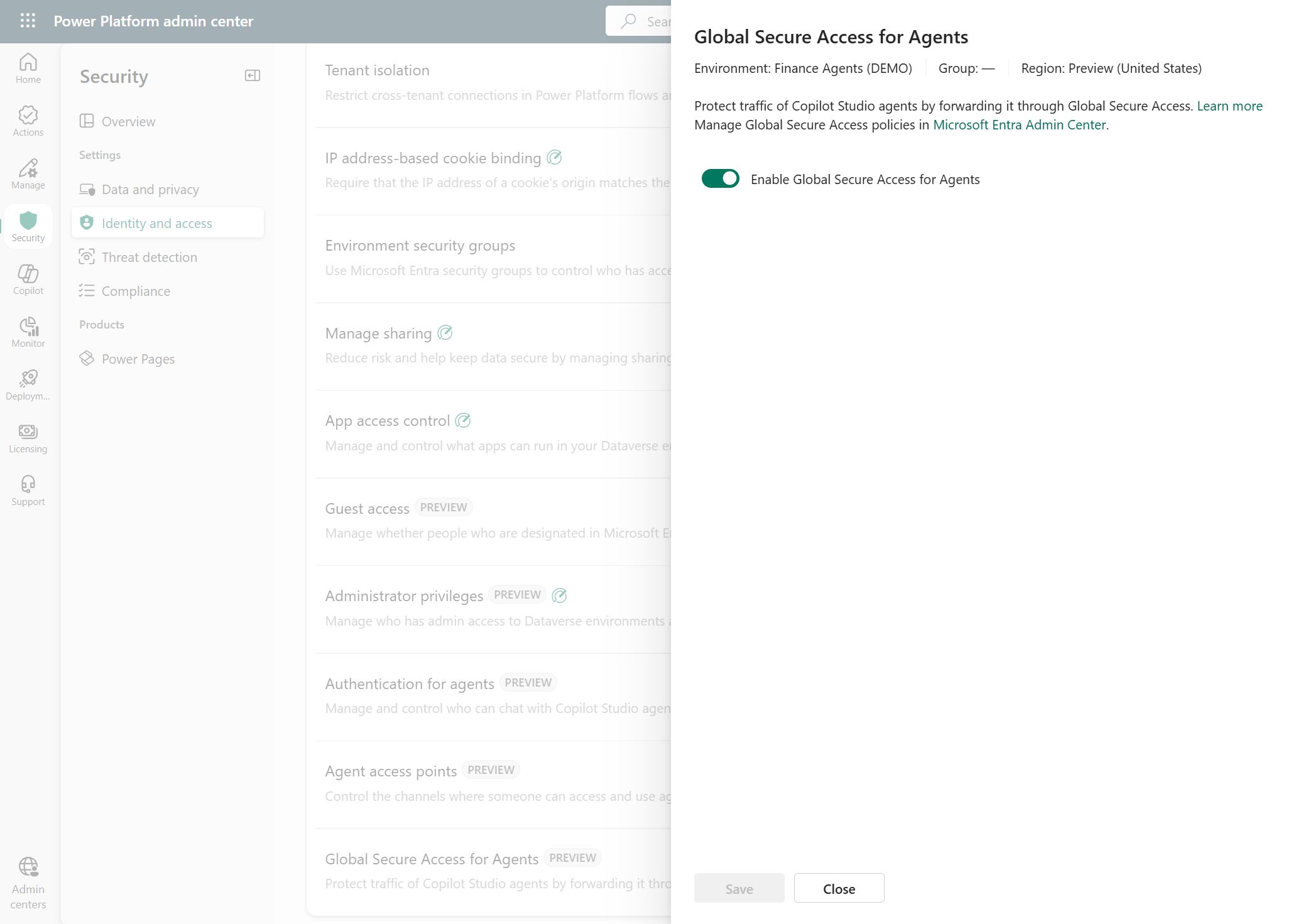
Konfiguration: Traffic Forwarding wird im Power Platform Admin Center pro Environment oder Environment-Group aktiviert. Die Policies selbst laufen über das Baseline Profile von Global Secure Access, tenant-weit, nicht pro Agent granular steuerbar.
Das ist momentan leider kein granularer Per-Agent-Filter. Die Policy gilt für den gesamten Traffic, der über forwarding-aktivierte Environments läuft.
2. Conditional Access für Agent Identities
Conditional Access für Agents unterscheidet sich fundamental von CA für Benutzer, weil das Ziel des Tokens je nach Access Pattern wechselt. Genau die drei Token Flows aus Teil I (OBO, Autonom, Agent User Account) bestimmen, worauf eine CA-Policy überhaupt zielen kann.
| Access Pattern | Token-Subjekt | CA Policy Target |
|---|---|---|
| Agent agiert on-behalf-of eines Users | User | User & Groups (nicht die Agent Identity) |
| Agent agiert autonom (Client Credentials) | Agent Identity | Agent Identity oder Blueprint |
| Agent agiert als Agent User Account | Agent User Account | Agent User Account (eigener Scope) |
Der häufigste Erstkonfigurations-Fehler: Eine Policy auf “All users” erfasst keine Agent User Accounts automatisch. Diese müssen explizit gescoped werden. Und im OBO-Flow bringt eine Policy auf die Agent Identity Nichts, weil der Token nie auf die Agent Identity ausgestellt wird.
Blueprint-Level Policies: Governance auf Klassenebene
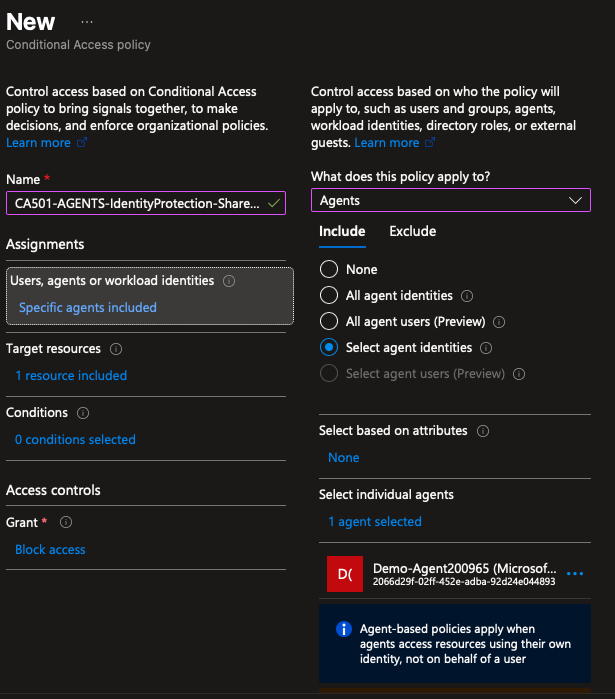
Statt jede Agent Identity einzeln zu targeten, kann eine Policy auf den Agent Identity Blueprint angewendet werden. Jede Agent Identity, die aus diesem Blueprint entsteht (auch zukünftige), erbt die Policy automatisch.
Praktischer Nutzen: Für eine Agent-Klasse mit klar definiertem Zweck (z. B. “alle HR-Copilot-Studio-Agents”) reicht eine Policy auf Blueprint-Ebene, statt bei jedem neuen Agent nachzuziehen.
Attribute-driven Conditional Access
Ab einer gewissen Agent-Anzahl wird Einzel-Targeting unpraktikabel. Custom Security Attributes lösen das: Agent Identities werden mit Business-Tags versehen (z. B. Sensitivity: Restricted), Policies zielen auf das Attribut statt auf einzelne Objekte oder Blueprints. Neue Agents mit demselben Tag werden automatisch erfasst.
”Microsoft-Managed” Policy-Templates
Microsoft liefert drei Templates, die die Einstiegshürde senken:
- Block access for high-risk agent identities: verknüpft direkt mit ID Protection Risk Levels (siehe Abschnitt 3)
- Autonomous agent access policy: für Client-Credentials-Flows
- On-behalf-of agent access policy: für delegierte Flows
Grenzen, die man momentan kennen sollte:
- Grant Control: Aktuell im Wesentlichen Block. Es gibt keine Agent-Äquivalenz zu MFA - ein Agent kann keinen zweiten Faktor liefern.
- CA schützt ausschließlich Ressourcen, die über Entra ID authentifizieren. Ein Agent, der eine Ressource per API-Key anspricht, umgeht Conditional Access.
- Eine Policy auf Blueprint deckt nur die Agent Identity ab, nicht einen damit verknüpften Agent User Account.
3. Entra ID Protection: Risky Agents
ID Protection überträgt das Konzept der Risk-basierten Erkennung auf Agent Identities. Die Signale unterscheiden sich bewusst von User-Risk-Detections: Agents haben kein “Impossible Travel”, aber andere Anomalie-Muster.
| Detection | Beschreibung |
|---|---|
| Confirmed compromised | Admin hat Agent manuell als kompromittiert bestätigt |
| Early life malicious activity | Neu erstellter Agent zeigt sofort mehrfach verdächtige Verhaltensmuster |
| Entra Directory Reconnaissance | Verdächtige Reconnaissance / High-Risk Directory-Operationen |
| Failed access attempt | Zugriffsversuch auf nicht-autorisierte Ressource fehlgeschlagen (Hinweis auf z.B.: Token-Replay) |
| Microsoft Entra Threat Intelligence | Übereinstimmung mit bekannten Threat Intelligence Indikatoren |
| Sign-in spike | Ungewöhnlich hohe Anmeldefrequenz gegenüber der Agent-Baseline |
| Unfamiliar resource access | Zugriff auf Ressourcen außerhalb des gewohnten Zugriffsmusters |
Risikodaten sind über Graph API abrufbar (riskyAgents, agentRiskDetections), 90 Tage Retention, exportierbar via Diagnostic Settings an Log Analytics / Storage / Event Hub / SIEM.
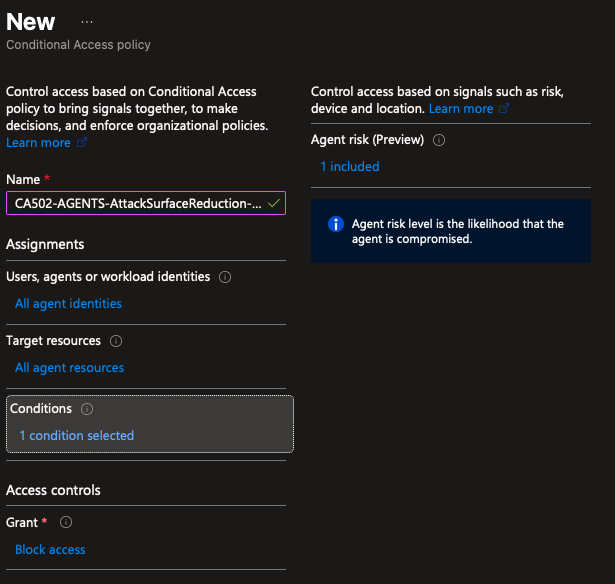
Das Risk-Signal wird über Conditional Access durchgesetzt: Eine Policy mit der Condition Agent risk (Preview) und Grant Block access sperrt kompromittiert-verdächtige Agents automatisch aus.
4. Access Packages: Just-in-Time mit Sponsor als Human-in-the-Loop
Agent Identities starten mit minimalen, vom Blueprint geerbten Berechtigungen. Alles darüber hinaus läuft über Access Packages aus Entitlement Management, mit demselben Genehmigungsmodell wie für menschliche Identitäten - nur dass hier entweder der Sponsor der Agent Identitiy oder spezifische Gruppen die Access Package Requests freigeben können.
Was zugewiesen werden kann:
- Security-Group-Mitgliedschaften
- Application OAuth API Permissions (inkl. Graph Application Permissions)
- Microsoft Entra Rollen
Konfiguration: Bei der Access-Package-Policy im Abschnitt “Who can get access” die Option “For users, service principals, and agent identities in your directory” wählen, dann “All agents”.
Wie funktioniert der Sponsor-Mechanismus?
Sobald ein Access Package mit Ablaufdatum zugewiesen und ein Sponsor auf der Agent Identity gesetzt ist, greift ein automatisierter Ablauf:
- Ablaufdatum nähert sich → Sponsor erhält Benachrichtigung
- Sponsor beantragt Verlängerung (falls Policy erlaubt) → neuer Approval-Zyklus
- Keine Aktion des Sponsors → Access Package läuft automatisch aus, Agent verliert Zugriff
Management-Oberflächen:
- My Access Portal (
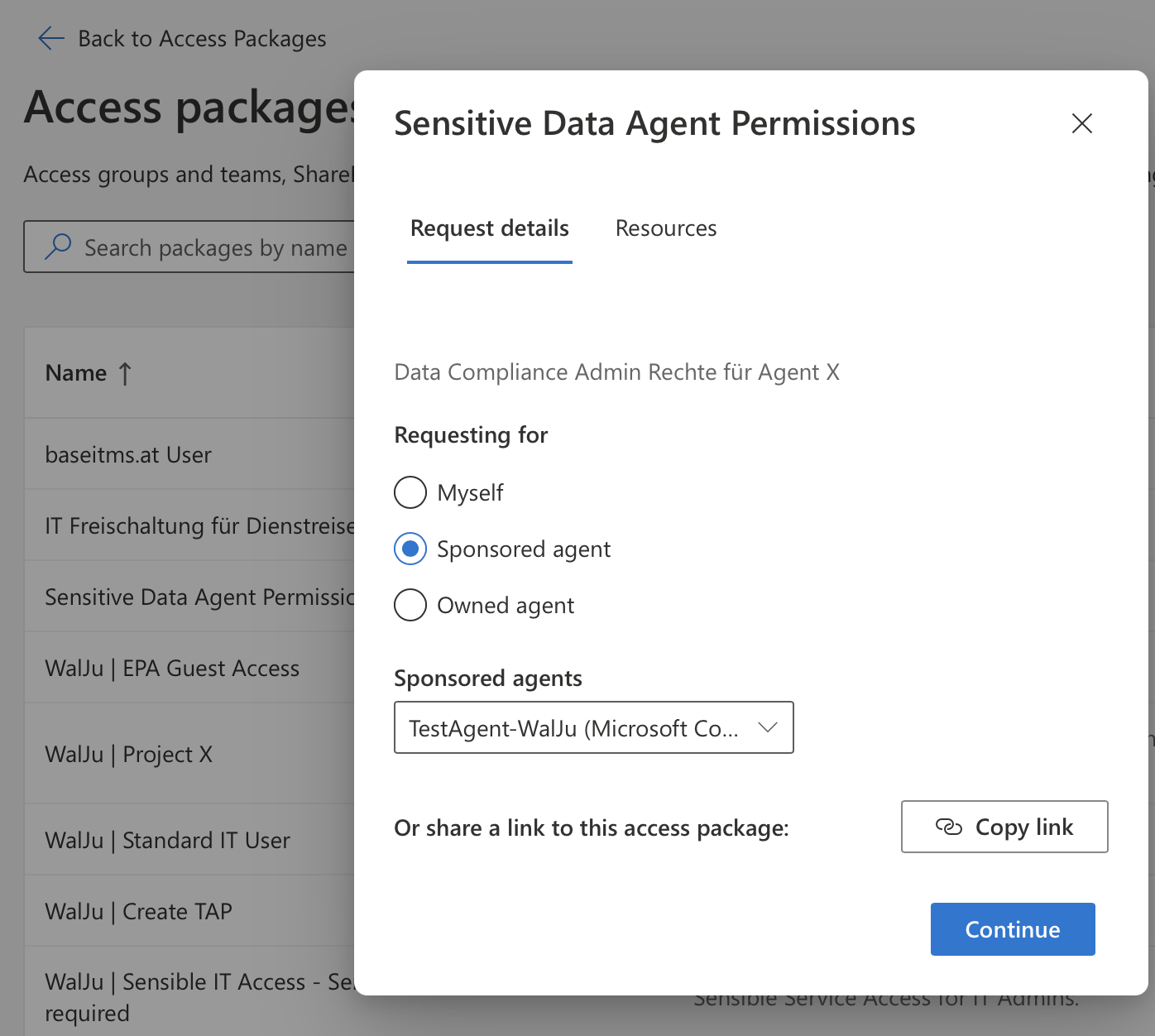
myaccess.microsoft.com): Sponsor/Owner beantragen Access Packages im Namen der Agent Identity
5. Sponsor-Verwaltung via Lifecycle Workflows: das Mover/Leaver-Problem
Der Sponsor-Mechanismus aus Abschnitt 4 ist nur so robust wie die Garantie, dass immer ein aktiver Sponsor existiert. Genau das ist historisch der Punkt, an dem Service-Account-Governance in der Praxis bricht: Der verantwortliche Mitarbeiter verlässt das Unternehmen oder wechselt die Rolle, der Service Account bleibt - jetzt ohne jede menschliche Verantwortung.
Microsoft löst das nicht durch eine Policy, sondern durch eine erzwungene Eigenschaft des Systems: Mindestens ein Sponsor ist für jede Agent Identity und jeden Blueprint verpflichtend. Verlässt ein Sponsor die Organisation, wird die Sponsorship automatisch an dessen Manager übertragen: es gibt keinen Zustand, in dem ein Agent sponsorlos existiert.
Zwei Lifecycle-Workflow-Templates stehen dafür bereit:
- Notification an Co-Sponsoren und Manager bei bevorstehendem Sponsor-Wechsel
- Automatischer Sponsorship-Transfer beim Rollenwechsel oder Austritt des Sponsors
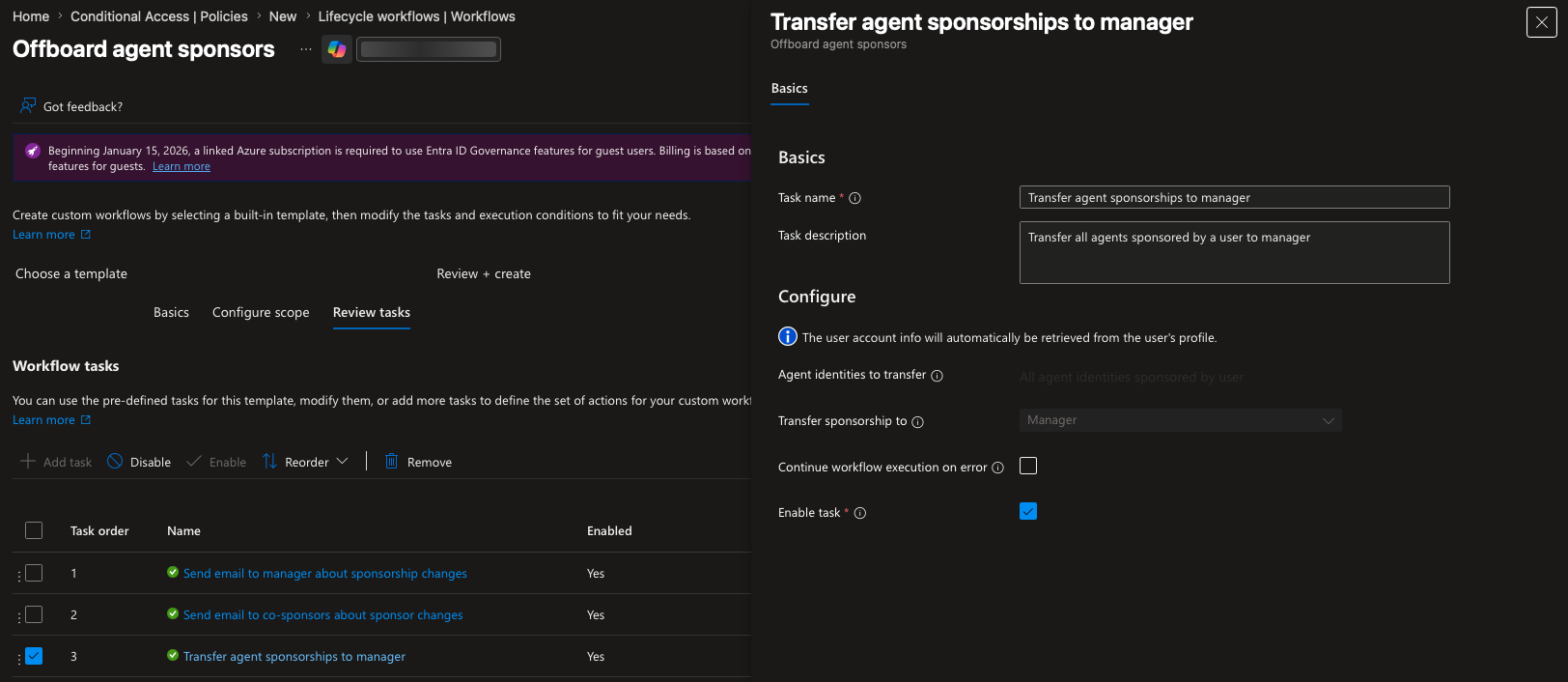
Der Effekt: Der aus Abschnitt 4 beschriebene Mechanismus für Access Packages bleibt intakt, selbst wenn Personal fluktuiert. Die Benachrichtigungskette bricht nicht ab, weil “der Sponsor” austauschbar an eine Rolle statt an eine Person gebunden wird.
Ausblick: Teil III
Damit sind die einige der momentan verfügbaren, technischen Features in Entra ID für Agent Identities beleuchtet worden. Teil III schließt die Serie mit der “Visibility”-Frage: Wie können wir eine kontrollierte Agent Visibility und Governance mit bestehenden Entra ID Features schaffen? Und was bietet uns Purview im Bereich der Data Governance mittlerweile an Möglichkeiten?
Referenzen
- Conditional Access for Agents
- Governing Agent Identities - Overview
- What’s new in Microsoft Entra Agent ID
- Protect agent identities with Microsoft Entra (Agent 365)
- ID Protection for Agents - Risky Agents
- Secure Web and AI Gateway for Copilot Studio Agents
- Agent identity sponsor tasks in Lifecycle Workflows
- Access packages for agent identities
- Microsoft Agent 365 - Plans and Pricing
”An agent without a sponsor is a service account without an owner, only autonomous.”
In Part I we saw that every agent is its own identity, with its own token lifecycle, its own credentials, and its own risk profile. The uncomfortable consequence: whoever manages identities also has to control them: who may access what, for how long, and who is accountable when something goes wrong.
Microsoft answers this in Agent 365 not with a single feature, but with an ever-growing set of features that make it possible to use agent identities just as controlled and securely as service accounts and user accounts. This part of the “Agent 365” blog series presents 5 technical features that are already available in Entra today.
| # | Control | Layer |
|---|---|---|
| 1 | Restrict network access for Copilot Studio agents | Network |
| 2 | Conditional Access for agent identities | Access |
| 3 | Entra ID Protection: Risky Agents | Detection |
| 4 | Access Packages as just-in-time entitlement (sponsor) | Governance |
| 5 | Sponsor management via Lifecycle Workflows (mover/leaver) | Lifecycle |
“Agent 365” is available as part of the E7 “Frontier Suite” or as a standalone license add-on. It is licensed not for the agent identity itself, but for every user who interacts with that agent.
1. Network access for Copilot Studio agents: Secure Web and AI Gateway
Copilot Studio agents call external URLs: directly via HTTP/HTTPS, via custom connectors, or via various MCP servers. Without network control and content filtering, that is the equivalent of a user browsing the internet completely unprotected.
Mechanism: Global Secure Access (Entra Internet Access) controls this agent traffic and lets us govern which URLs and website categories the agent may call, and which connectors and MCP servers it may interact with.
Configuration: Traffic forwarding is enabled in the Power Platform Admin Center per environment or environment group. The policies themselves run through the baseline profile of Global Secure Access, tenant-wide, not granularly steerable per agent.
This is currently unfortunately not a granular per-agent filter. The policy applies to all traffic that flows through forwarding-enabled environments.
2. Conditional Access for agent identities
Conditional Access for agents differs fundamentally from CA for users, because the target of the token changes depending on the access pattern. Exactly the three token flows from Part I (OBO, autonomous, agent user account) determine what a CA policy can even target.
| Access Pattern | Token Subject | CA Policy Target |
|---|---|---|
| Agent acts on-behalf-of a user | User | Users & Groups (not the agent identity) |
| Agent acts autonomously (client credentials) | Agent Identity | Agent Identity or Blueprint |
| Agent acts as an Agent User Account | Agent User Account | Agent User Account (own scope) |
The most common first-config mistake: a policy targeting “All users” does not automatically cover agent user accounts. Those must be scoped explicitly. And in the OBO flow, a policy on the agent identity does nothing, because the token is never issued to the agent identity.
Blueprint-level policies: governance at class level
Instead of targeting each agent identity individually, a policy can be applied to the agent identity blueprint. Every agent identity derived from that blueprint (including future ones) inherits the policy automatically.
Practical benefit: for an agent class with a clearly defined purpose (e.g. “all HR Copilot Studio agents”), a single policy at blueprint level is enough, instead of chasing after every new agent.
Attribute-driven Conditional Access
Beyond a certain number of agents, individual targeting becomes impractical. Custom security attributes solve this: agent identities are tagged with business labels (e.g. Sensitivity: Restricted), and policies target the attribute instead of individual objects or blueprints. New agents with the same tag are captured automatically.
”Microsoft-Managed” policy templates
Microsoft ships three templates that lower the barrier to entry:
- Block access for high-risk agent identities: tied directly to ID Protection risk levels (see section 3)
- Autonomous agent access policy: for client-credentials flows
- On-behalf-of agent access policy: for delegated flows
Limitations to be aware of right now:
- Grant control: currently essentially Block. There is no agent equivalent to MFA. An agent cannot provide a second factor.
- CA protects only resources that authenticate through Entra ID. An agent that reaches a resource via an API key bypasses Conditional Access.
- A policy on the blueprint covers only the agent identity, not a linked agent user account.
3. Entra ID Protection: Risky Agents
ID Protection extends the concept of risk-based detection to agent identities. The signals deliberately differ from user risk detections: agents have no “impossible travel”, but they have other anomaly patterns.
| Detection | Description |
|---|---|
| Confirmed compromised | Admin manually confirmed the agent as compromised |
| Early life malicious activity | Newly created agent immediately shows multiple suspicious behavior patterns |
| Entra Directory Reconnaissance | Suspicious reconnaissance / high-risk directory operations |
| Failed access attempt | Access attempt on an unauthorized resource failed (indicator of e.g. token replay) |
| Microsoft Entra Threat Intelligence | Match against known threat intelligence indicators |
| Sign-in spike | Unusually high sign-in frequency compared to the agent baseline |
| Unfamiliar resource access | Access to resources outside the usual access pattern |
Risk data is queryable via Graph API (riskyAgents, agentRiskDetections), 90-day retention, exportable via diagnostic settings to Log Analytics / Storage / Event Hub / SIEM.
The risk signal is enforced through Conditional Access: a policy with the condition Agent risk (Preview) and grant Block access automatically locks out agents suspected of being compromised.
4. Access Packages: just-in-time with a sponsor as human-in-the-loop
Agent identities start with minimal permissions inherited from the blueprint. Anything beyond that runs through Access Packages from Entitlement Management, with the same approval model as for human identities, except that here either the agent identity’s sponsor or specific groups can approve the access package requests.
What can be assigned:
- Security group memberships
- Application OAuth API permissions (incl. Graph application permissions)
- Microsoft Entra roles
Configuration: in the access package policy, under “Who can get access”, choose the option “For users, service principals, and agent identities in your directory”, then “All agents”.
How does the sponsor mechanism work?
Once an access package with an expiry date is assigned and a sponsor is set on the agent identity, an automated flow kicks in:
- Expiry date approaches → sponsor receives a notification
- Sponsor requests an extension (if the policy allows) → new approval cycle
- No action from the sponsor → the access package expires automatically, the agent loses access
Management surfaces:
- My Access Portal (
myaccess.microsoft.com): sponsors/owners request access packages on behalf of the agent identity
5. Sponsor management via Lifecycle Workflows: the mover/leaver problem
The sponsor mechanism from section 4 is only as robust as the guarantee that an active sponsor always exists. That is historically the exact point where service account governance breaks in practice: the responsible employee leaves the company or changes roles, the service account remains, now without any human accountability.
Microsoft solves this not through a policy, but through an enforced property of the system: at least one sponsor is mandatory for every agent identity and every blueprint. When a sponsor leaves the organization, sponsorship is automatically transferred to their manager: there is no state in which an agent exists without a sponsor.
Two lifecycle workflow templates are available for this:
- Notification to co-sponsors and the manager on an upcoming sponsor change
- Automatic sponsorship transfer when the sponsor changes role or leaves
The effect: the access package mechanism described in section 4 stays intact even as staff fluctuate. The notification chain does not break, because “the sponsor” is bound to a role rather than to a person, and is therefore interchangeable.
Outlook: Part III
That covers some of the technical features currently available in Entra ID for agent identities. Part III closes the series with the “visibility” question: how do we create controlled agent visibility and governance with existing Entra ID features? And what does Purview now offer in the area of data governance?
References
- Conditional Access for Agents
- Governing Agent Identities - Overview
- What’s new in Microsoft Entra Agent ID
- Protect agent identities with Microsoft Entra (Agent 365)
- ID Protection for Agents - Risky Agents
- Secure Web and AI Gateway for Copilot Studio Agents
- Agent identity sponsor tasks in Lifecycle Workflows
- Access packages for agent identities
- Microsoft Agent 365 - Plans and Pricing