Credential Relay Phishing: AitM-Angriffe ganz ohne Reverse Proxy
Vom Reverse Proxy zum Credential Relay Phishing
Reverse Proxy Phishing wird zunehmend erkannt
Der Klassiker unter den AitM-Frameworks (Evilginx, Modlishka, Muraena & Co) funktioniert bisher fast immer nach demselben Prinzip: ein Reverse Proxy sitzt zwischen User und echtem Identity Provider, leitet die komplette Original-Seite 1:1 durch und schneidet dabei Credentials sowie Session-Token mit. Wie das im Detail funktioniert, hab ich in AitM-Phishing: Der Angreifer, der mitliest beschrieben.
Genau dieses 1:1-Durchleiten ist inzwischen aber das Problem für Angreifer geworden. Mehrere Entwicklungen haben Reverse Proxy Phishing in den letzten Jahren deutlich riskanter gemacht:
- Client-seitige Detection direkt im Browser. Mit PhishGuard hab ich selbst so ein Tool gebaut: 12 Signale werten aus, ob eine Seite Microsoft-Artefakte enthält, die auf einer fremden Domain nichts verloren haben: Tenant-Branding, JS-Runtime-Marker, MS-CDN-Ressourcen. Weil ein Reverse Proxy den echten DOM zwingend spiegeln muss, um funktionsfähig zu bleiben, liegt er fast immer weit über dem Detection-Threshold.
- TLS-Handshake-Fingerprinting und Browser-Telemetrie. Google und Cloudflare erkennen mittlerweile recht zuverlässig, ob eine Verbindung durch einen Reverse Proxy läuft statt direkt vom Client zu kommen. Kuba Gretzky, der Entwickler von Evilginx, spricht das in seinem aktuellen Video selbst offen an.
- Custom-CSS-Pixel-Trick. In Entra ID ließ sich über Custom Branding ein externes CSS einbinden, das prüft ob eine Ressource geladen wird. Wird sie geblockt, deutet das auf einen Proxy hin. Details dazu im PhishGuard-Artikel. Microsoft schafft dieses Custom-CSS-Branding aber gerade ab, womit auch dieser Trick perspektivisch wegfällt.
Die logische Konsequenz für Angreifer: Wenn 1:1-Durchleitung zunehmend leicht auffliegt, hostet man die Login-Seite einfach selbst. Genau das zeigt Kuba Gretzky in seinem neuesten Video und nennt es Credential Relay Phishing.
Credential Relay Phishing + Browser-in-the-Browser: Wie der neue Ansatz funktioniert
Der entscheidende Unterschied zum Reverse Proxy: Es wird nichts mehr durchgeleitet. Die komplette Login-Seite, die das Opfer sieht, ist eine vom Angreifer selbst gehostete, statische Fälschung: kein Traffic zum echten Identity Provider, keine echte Original-Seite im Hintergrund des Opfer-Browsers.
Der Ablauf im Detail:
- Das Opfer klickt auf den Phishing-Link und landet auf einer Seite, die mit HTML/JS ein komplettes Browser-in-the-Browser (BitB)-Fenster nachbaut: Fake-Titelleiste, Fake-URL-Zeile, Fake-Google-Login. Die Technik wurde ursprünglich 2022 von mr.d0x vorgestellt und ist jetzt nativ in Evilginx Pro 5.0 integriert.
- Sobald das Opfer Email und Passwort in die Fake-Seite eingibt, werden nur diese Credentials an den Angreifer übertragen, nicht der komplette Traffic.
- Parallel dazu startet auf dem Server des Angreifers ein echter, automatisierter Browser (“Puppet-Browser”), der sich mit genau diesen Credentials live beim echten Identity Provider anmeldet.
- Verlangt der echte IdP eine starke MFA-Methode wie FIDO2, kann der automatisierte Browser den Prompt nicht erfüllen. Er hat ja keinen physischen Security Key. Stattdessen wählt er über “Andere Methode versuchen” gezielt eine schwächere, phishbare Fallback-Methode, z.B. eine einfache Push-Bestätigung.
- Das Opfer bekommt diesen Push-Prompt tatsächlich auf sein eigenes Gerät, weil es sich um eine echte, laufende Anmeldung handelt. Bestätigt es die Anfrage arglos, ist der Login serverseitig abgeschlossen.
- Der Angreifer übernimmt den resultierenden Session-Cookie aus seinem Puppet-Browser und ist im Account. Das Opfer wird währenddessen auf ein harmlos aussehendes Dokument umgeleitet und bemerkt nichts.
Der Downgrade-Schritt (Punkt 4) ist derselbe Mechanismus, den ich in MFA Downgrade Attacks im Detail beschrieben habe. Der Fokus hier liegt bewusst auf dem Trägerangriff drumherum: kein Reverse Proxy mehr, sondern gezieltes Credential Relay Phishing kombiniert mit Browser-in-the-Browser.
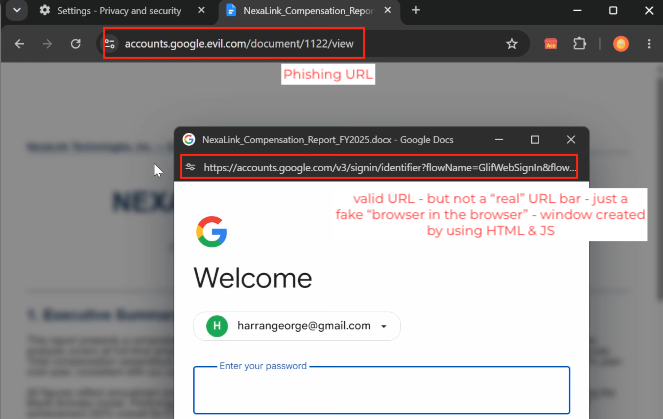
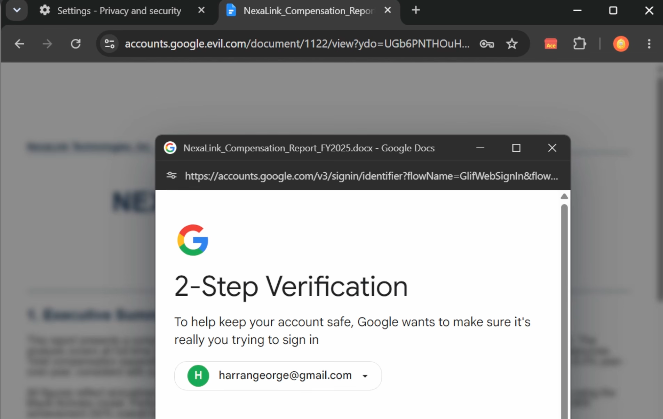
Gezeigt wird das Ganze in der Demo gegen einen Google-Account. Die Technik funktioniert aber identisch gegen das Microsoft-Loginportal, ein passendes Phishlet vorausgesetzt. Die genaue Downgrade-Mechanik gegen Entra ID hab ich bereits in MFA Downgrade Attacks im Detail gezeigt. Hier soll es primär um die neue Trägertechnik gehen.
Alle Screenshots in diesem Artikel stammen aus dem Video „Credential Relay Phishing: Downgrading FIDO MFA with Evilginx Pro” von Kuba Gretzky, dem Entwickler von Evilginx.
Warum aktuelle Detection-Mechanismen hier fast machtlos sind
Genau die Punkte, die Reverse Proxy Phishing zuletzt riskanter gemacht haben, greifen bei Credential Relay Phishing + BitB nicht mehr.
PhishGuard und ähnliche DOM-basierte Detection-Tools laufen ins Leere. Die 12 Signale, die PhishGuard auswertet, basieren darauf, dass ein Reverse Proxy den echten DOM einer Microsoft- oder Google-Loginseite 1:1 durchleitet, inklusive Tenant-Branding, JS-Runtime-Markern, CDN-Ressourcen. Bei Credential Relay Phishing gibt es diesen echten DOM aber gar nicht. Der Angreifer baut seine Fake-Seite komplett selbst und obfuskiert sie zusätzlich gezielt:
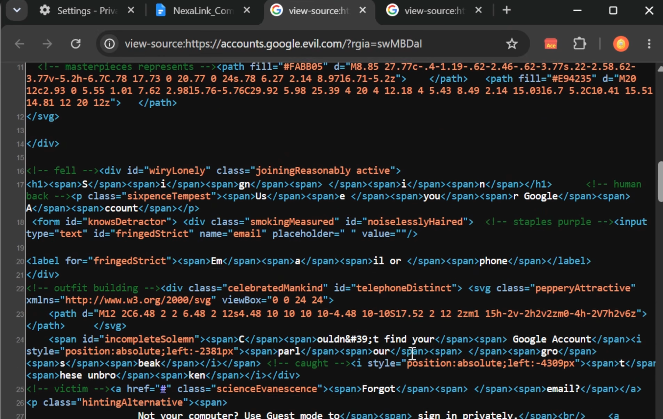
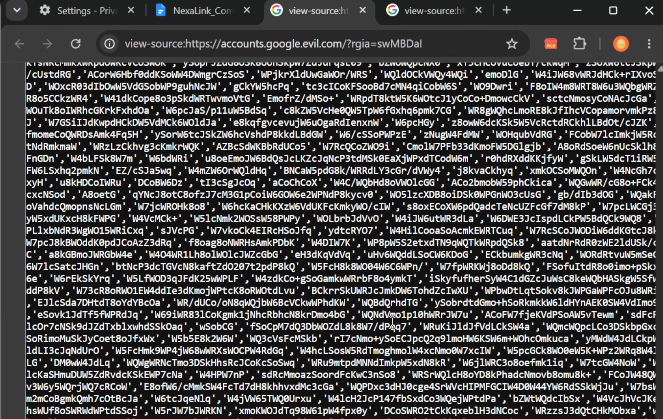
Randomisierte Attribute, über mehrere Spans zerstückelter Text und Off-Screen-Decoy-Content sorgen dafür, dass weder signaturbasierte Scanner noch DOM-Similarity-Checks brauchbare Treffer liefern. Der Score bleibt deutlich unter jedem sinnvollen Threshold, nicht weil die Seite besonders gut versteckt wäre, sondern schlicht weil keines der erwarteten Microsoft-/Google-Artefakte vorhanden ist, nach denen die Detection eigentlich sucht.
Was nach wie vor funktioniert, mit Einschränkung: PhishGuard zeigt auf legitimen Microsoft-Loginseiten ein “Verified”-Badge an. Auf der Fake-BitB-Seite bleibt dieses Badge logischerweise aus, weil es sich technisch gar nicht um eine echte Microsoft-/Google-Domain handelt. Ein aufmerksamer User, der weiß worauf er achten muss, sollte das bemerken. Das Problem dabei: Hier wird nicht vor einer Bedrohung gewarnt, sondern lediglich ein positives Signal nicht angezeigt. Und das Fehlen eines Signals fällt Usern in der Praxis erfahrungsgemäß deutlich seltener auf als eine aktive Warnung.
Der Custom-CSS-Pixel-Trick versagt komplett. Er funktioniert nur, wenn die echte IdP-Seite tatsächlich geladen wird und das eingebundene CSS mitgeliefert wird. Bei Credential Relay Phishing wird die echte Login-Seite im Browser des Opfers nie geladen, es gibt schlicht keine Verbindung zum echten IdP, die man abfangen könnte.
Weitere Gründe, warum die Erkennung schwerfällt:
- Kein durchgeleiteter Traffic zum echten IdP → TLS-Fingerprinting und Browser-Telemetrie-Checks von Google/Cloudflare laufen ins Leere, es gibt schlicht nichts zu erkennen.
- Die Fake-URL-Zeile im BitB-Fenster ist reines HTML/JS-Rendering, keine echte Navigation. URL-Reputation-Checks des Browsers (z.B. Safe Browsing) greifen an der echten Adresszeile, die unabhängig davon eine beliebige Domain zeigen kann.
- Laut Kuba Gretzky umgeht die Technik in seinen Tests auch Chrome Enhanced Protection vollständig.
Credential Relay Phishing + Browser-in-the-Browser hebelt praktisch jede aktuell verbreitete client- und netzwerkseitige AitM-Detection aus: vom Custom-CSS-Trick bis zu DOM-Signal-basierten Extensions wie PhishGuard. Die einzige Komponente im Ablauf, die sich davon nicht beeindrucken lässt, ist der Identity Provider selbst.
Der einzige verlässliche Schutz: Authentication Strength mit Phishing-Resistant MFA
So gut die Fälschung auch aussieht, an einer Stelle bleibt der Angriff angreifbar: bei der tatsächlichen Auswahl der MFA-Methode durch den Puppet-Browser im Hintergrund.
Als phishing-resistant gelten in der Entra-ID-Welt konkret:
- FIDO2 Security Keys
- Windows Hello for Business
- Certificate-Based Authentication (CBA)
- Passkeys (device-bound)
Diese Methoden sind in der eingebauten Authentication-Strength “Phishing-resistant MFA” zusammengefasst. Entscheidend ist aber wie diese Strength eingesetzt wird: Nur wenn eine Conditional-Access-Policy explizit “Authentifizierungsstärke erfordern” mit genau dieser Strength konfiguriert ist (statt des klassischen “Mehrstufige Authentifizierung erfordern”), kann Entra ID keinen Token ausstellen, der auf einer der schwächeren Fallback-Methoden basiert. Der Puppet-Browser mag zwar erfolgreich auf “Andere Methode versuchen” klicken und die Push-Bestätigung durchbekommen. Der IdP verweigert den Sign-in trotzdem, weil die Anmeldung nicht mit einer erlaubten Methode abgeschlossen wurde.
Ist ein User dagegen nur über “Require MFA” geschützt und hat sowohl FIDO2 als auch Authenticator-Push registriert, bleibt er trotz vorhandenem FIDO2-Key genau für diesen Downgrade-Pfad angreifbar. Wie man Authentication Strength konkret konfiguriert, hab ich Schritt für Schritt in MFA Downgrade Attacks beschrieben.
Ich arbeite aktuell an einer Möglichkeit, auch diese Form von Phishing (Credential Relay + Browser-in-the-Browser) mit PhishGuard zuverlässig zu erkennen. Stay tuned!
From Reverse Proxy to Credential Relay Phishing
Reverse proxy phishing is getting caught more often
The classic approach used by AitM frameworks (Evilginx, Modlishka, Muraena & co) has worked the same way for years: a reverse proxy sits between the user and the real identity provider, relays the entire original page 1:1, and captures credentials and session tokens along the way. I covered exactly how that works in AitM Phishing: The Attacker Who Watches Your Screen.
That very 1:1 relaying has become the attackers’ problem. Several developments have made reverse proxy phishing noticeably riskier over the past years:
- Client-side detection directly in the browser. With PhishGuard I built exactly such a tool myself: 12 signals evaluate whether a page contains Microsoft artifacts that have no business being on a foreign domain: tenant branding, JS runtime markers, MS CDN resources. Because a reverse proxy has to mirror the real DOM to stay functional, it almost always sits well above the detection threshold.
- TLS handshake fingerprinting and browser telemetry. Google and Cloudflare have gotten quite reliable at detecting whether a connection is routed through a reverse proxy instead of coming directly from the client. Kuba Gretzky, Evilginx’s creator, addresses this openly in his latest video.
- Custom CSS pixel trick. In Entra ID, custom branding could be used to inject an external CSS file that checks whether a resource loads. If it’s blocked, that indicates a proxy. Details in the PhishGuard article. Microsoft is deprecating custom CSS branding, though, which will eventually take this trick down too.
The logical consequence for attackers: if 1:1 relaying gets caught more and more easily, just host the login page yourself. That’s exactly what Kuba Gretzky demonstrates in his latest video, calling it Credential Relay Phishing.
Credential Relay Phishing + Browser-in-the-Browser: How the new approach works
The key difference from a reverse proxy: nothing gets relayed anymore. The entire login page the victim sees is a static fake, hosted entirely by the attacker: no traffic to the real identity provider, no real original page loading in the background of the victim’s browser.
The flow in detail:
- The victim clicks the phishing link and lands on a page that rebuilds a complete Browser-in-the-Browser (BitB) window using HTML/JS: fake title bar, fake URL bar, fake Google login. The technique was originally introduced by mr.d0x in 2022 and is now natively built into Evilginx Pro 5.0.
- As soon as the victim enters their email and password into the fake page, only those credentials get sent to the attacker, not the full traffic.
- In parallel, a real, automated browser (“puppet browser”) on the attacker’s server signs in live at the real identity provider using those exact credentials.
- If the real IdP requires a strong MFA method like FIDO2, the automated browser can’t satisfy the prompt. It has no physical security key. Instead, it clicks “Try another way” and deliberately selects a weaker, phishable fallback method, e.g. a simple push approval.
- The victim actually receives that push prompt on their own device, because it’s a real, in-progress sign-in. If they approve it without suspicion, the sign-in completes server-side.
- The attacker grabs the resulting session cookie from their puppet browser and takes over the account. Meanwhile, the victim gets redirected to a harmless-looking document and notices nothing.
The downgrade step (point 4) is the same mechanism I described in detail in MFA Downgrade Attacks. The focus here is deliberately on the carrier attack around it: no more reverse proxy, but targeted credential relay phishing combined with browser-in-the-browser.
The demo targets a Google account, but the technique works identically against the Microsoft login portal given a matching phishlet. The exact downgrade mechanics against Entra ID are already covered in detail in MFA Downgrade Attacks. This article focuses primarily on the new carrier technique itself.
All screenshots in this article are taken from the video „Credential Relay Phishing: Downgrading FIDO MFA with Evilginx Pro” by Kuba Gretzky, creator of Evilginx.
Why current detection mechanisms are nearly powerless here
The very same factors that recently made reverse proxy phishing riskier stop working against Credential Relay Phishing + BitB.
PhishGuard and similar DOM-based detection tools come up empty. The 12 signals PhishGuard evaluates rely on a reverse proxy relaying the real DOM of a Microsoft or Google login page 1:1, including tenant branding, JS runtime markers, CDN resources. With Credential Relay Phishing, that real DOM simply doesn’t exist. The attacker builds their fake page entirely from scratch and deliberately obfuscates it on top:
Randomized attributes, text fragmented across multiple spans, and off-screen decoy content ensure that neither signature-based scanners nor DOM-similarity checks return usable hits. The score stays well under any sensible threshold, not because the page is especially well hidden, but simply because none of the expected Microsoft/Google artifacts the detection is actually looking for are present.
What still works, with a caveat: PhishGuard shows a “Verified” badge on legitimate Microsoft login pages. On the fake BitB page, that badge logically stays absent, since it’s technically not a real Microsoft/Google domain at all. An attentive user who knows what to look for should notice. The problem: this isn’t a warning about a threat, it’s simply the absence of a positive signal. And in practice, users notice a missing signal far less reliably than an active warning.
The custom CSS pixel trick fails outright. It only works if the real IdP page actually loads and ships the injected CSS. With Credential Relay Phishing, the real login page never loads in the victim’s browser at all, there’s simply no connection to the real IdP to intercept.
Further reasons detection struggles here:
- No relayed traffic to the real IdP → TLS fingerprinting and browser telemetry checks from Google/Cloudflare have nothing to detect.
- The fake URL row in the BitB window is pure HTML/JS rendering, not real navigation. Browser URL reputation checks (e.g. Safe Browsing) apply to the real address bar, which can independently show any arbitrary domain.
- According to Kuba Gretzky, the technique fully evaded Chrome Enhanced Protection in his testing.
Credential Relay Phishing + Browser-in-the-Browser defeats practically every widely deployed client- and network-side AitM detection today: from the custom CSS trick to DOM-signal-based extensions like PhishGuard. The only component in the chain that isn’t impressed by any of it is the identity provider itself.
The only reliable protection: Authentication Strength with phishing-resistant MFA
However convincing the fake looks, the attack stays vulnerable at exactly one point: the actual MFA method selection made by the puppet browser in the background.
In the Entra ID world, phishing-resistant specifically means:
- FIDO2 security keys
- Windows Hello for Business
- Certificate-Based Authentication (CBA)
- Device-bound passkeys
These methods are bundled in the built-in “Phishing-resistant MFA” Authentication Strength. What matters is how that strength gets applied: only when a Conditional Access policy explicitly requires “Require authentication strength” with exactly that strength (instead of the classic “Require multifactor authentication”) can Entra ID be prevented from issuing a token based on one of the weaker fallback methods. The puppet browser might successfully click “Try another way” and get the push approval through. The IdP still refuses the sign-in, because it wasn’t completed with an allowed method.
If a user is only protected via “Require MFA” and has both a FIDO2 key and Authenticator push registered, they remain vulnerable to exactly this downgrade path despite owning a FIDO2 key. How to configure Authentication Strength step by step is covered in MFA Downgrade Attacks.
I’m currently working on a way to reliably detect this form of phishing (credential relay + browser-in-the-browser) with PhishGuard too. Stay tuned!